
WWCC Printing Services
Getting Something Professionally Printed
WWCC has high-quality color printers on all campuses. For most day-to-day needs (agendas, syllabi, simple flyers for a classroom, etc.), you can print in-house.
If you need something more professional — like business cards, multi-page booklets, NCR forms, glossy flyers, laminated posters, or mounted foam boards — we can help you get that produced correctly and billed to the right budget.
First Question: Who is the Audience?
1. Materials for External Audiences
If the item will be seen by prospective students, community partners, donors, or alumni, it is considered marketing material and must go through the Marketing Department. Marketing will coordinate design, branding, and printing for you.
Reminder: Do not create or share your own materials for audiences outside the college without Marketing. This protects brand, accuracy, and compliance.
2. Materials for Internal Audiences
If the item is only for current students, faculty, or staff, you may create and print it yourself on campus (for example: advising forms, internal process checklists, locker room signs, etc.).
If you’re not sure if something counts as internal or external, treat it as external.
Working With Marketing (When It’s an External Piece)
If you’re already working with the Marketing Department’s Graphic Designer on a project, we’ll help with printing. For small runs, we can send you a final print-ready file to submit to Lane Printing & Design. For large runs, we’ll handle the outsourcing and get the best pricing for you.
Our Print Vendor: Lane Printing & Design
WWCC has an agreement with Lane Printing & Design in Walla Walla. They are approved, can directly bill WWCC, and you don’t need a P-card.
Lane Printing & Design
325 A Street (near the airport)
Phone: 509.540.4368
You’ll request work through their WWCC Print Portal.
How to Submit a Print Job to Lane Printing & Design
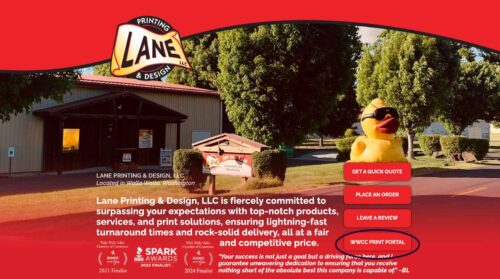
Step 1. Go to the WWCC Print Portal
Visit Lane Printing & Design’s website and click the ‘WWCC Print Portal’ button in the bottom right corner.
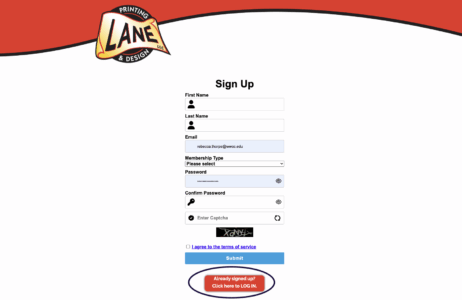
Step 2. Log in (or create an account)
If you’ve used the portal before, click ‘Already signed up? Click here to LOG IN.’ If you’re new, create an account.
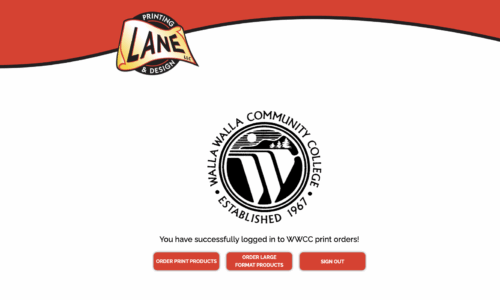
Step 3. Choose what you’re ordering
You’ll see two main options:
• Order Print Products – for flyers, brochures, forms, booklets.
• Order Large Format Products – for banners, signs, posters, and foam-core boards.
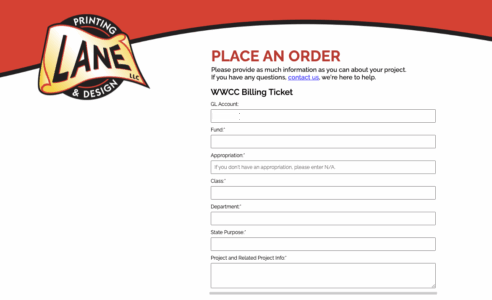
Step 4. Fill out the order form
There are two parts: billing information and job details. Fill out billing accurately so the Business Office can charge the correct budget.
GL Account: This is the budget line you want to charge. Example: 5030024 – Advertising (this is not your number; ask your department admin if unsure).
Fund / Class / Dept: These are tied to your fund number. (Again, ask your admin if unsure.)
State Purpose: Always enter ‘N’ (for Null).
Quick Who-Does-What
You / Your Department:
• Print internal-use materials on campus printers.
• Know your GL / Fund / Class / Dept numbers.
• Submit orders through the Lane WWCC Print Portal when you need professional output.
Marketing & Communications:
• Designs and approves all public-facing materials.
• Manages vendor printing for major runs.
• Ensures brand and accessibility compliance.
Lane Printing & Design:
• Can print your business cards and door name plates.
• Can print large printing jobs that you submit.
• Bills WWCC correctly.
• Can answer technical questions about paper, binding, laminating, banners, and mounting.
Need Help?
Unsure if your project should go through Marketing? Email Marketing & Communications at marketing@wwcc.edu.
Unsure how to fill out billing? Ask your department administrative assistant.
Unsure what to click in the portal? Call Lane Printing & Design at 509.540.4368.